Drawing a line
To create a line, you need to use the following primitive:
gui.PRIM_LINES
To create a line, use a pair of VERTEX2F objects, this will create a line between the 2 coordinates that you give. For example:
[gui.PRIM_LINES,
    [gui.DL_VERTEX2F(0, 0),
    gui.DL_VERTEX2F(500, 300)]
]
Will create a 1-pixel thick white line when used with the function gui.show(). To change the thickness of the line the following command is used:
[gui.DL_LINE_WIDTH(5)]
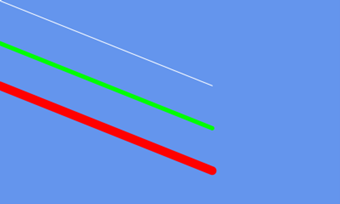
The thickness will be the width on either side of the line. This causes a curve at the end as the way it is drawn is using loads of points and hence causes this circular end. The following code shows examples of this
import gui

gui.show([
    # Default thickness white line
    [gui.PRIM_LINES,
    [gui.DL_VERTEX2F(0, 0),
    gui.DL_VERTEX2F(500, 200)]],

    # Thicker green line
    [gui.DL_COLOR_RGB(0,255,0)],
    [gui.DL_LINE_WIDTH(5)],
    [gui.DL_BEGIN(gui.PRIM_LINES)],
    [gui.DL_VERTEX2F(0, 100)],
    [gui.DL_VERTEX2F(500, 300)],

    # Very thick red line
    [gui.DL_LINE_WIDTH(10)],
    [gui.DL_COLOR_RGB(255,0,0)],
    [gui.DL_VERTEX2F(0, 200)],
    [gui.DL_VERTEX2F(500, 400)],
    [gui.DL_END()],])
Drawing a continuous line
This is very similar to the above except all points within this primitive will join:
gui.PRIM_LINE_STRIP
This can be useful when creating custom shapes. This is used very commonly with DL_BEGIN/END() because it allows the creation of nice long connected lines with the BEGIN until the END is reached. Other than the way the lines join it is the same as the above.
Continuous line that fills from directions
These primitives take the same inputs as PRIM_LINE_STRIP except once the line is drawn they get filled in a direction based on which one you use:
gui.PRIM_EDGE_STRIP_A # Above to Below
gui.PRIM_EDGE_STRIP_B # Below to Above
gui.PRIM_EDGE_STRIP_L # Right to Left
gui.PRIM_EDGE_STRIP_R # Left to Right
The colour of this fill is decided by:
[gui.DL_COLOR_RGB(0,255,0)]
The following code can be used to play about with all of these:
import gui

gui.show([
    # Uncomment to see each type in your code
    [gui.DL_COLOR_RGB(255,168,64)],
    [gui.DL_BEGIN(gui.PRIM_LINE_STRIP)],
    # [gui.DL_BEGIN(gui.PRIM_EDGE_STRIP_A)],
    # [gui.DL_BEGIN(gui.PRIM_EDGE_STRIP_B)],
    # [gui.DL_BEGIN(gui.PRIM_EDGE_STRIP_L)],
    # [gui.DL_BEGIN(gui.PRIM_EDGE_STRIP_R)],
    [gui.DL_VERTEX2F(10,10)],
    [gui.DL_VERTEX2F(500,200)],
    [gui.DL_VERTEX2F(600,400)],
    [gui.DL_END()],])
For uses of this, see Filling a shape for details