Common issues
This section discusses common problems that we have found and also suggests ways of debugging and resolving them.
SD Card is in read-only mode
A very common issue you will almost definitely run into is that your SD Card is in read only mode. Look at the little lock switch at the side of your SD card. This is usually either yellow or white. This should be at the top/as close as it can be to the contact side. If it isn’t then it is likely in read-only mode. This will cause it to not operate correctly on your VBOX Touch and will also mean you cannot add any files to it. The images below demonstrate this further:
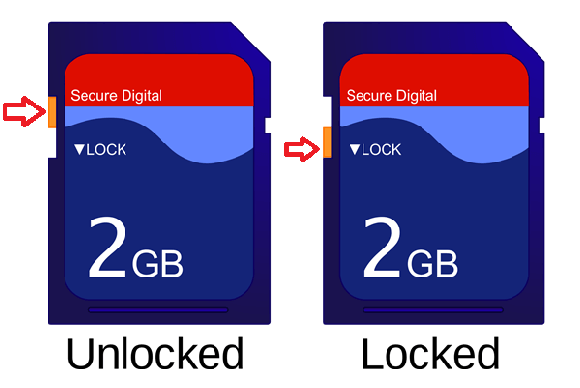
To fix it, simply move the lock switch to the top. To test it is now working plug this SD Card into your computer and attempt to add a file to it. If the file adds successfully then it should operate correctly on the VBOX Touch.
Callbacks
Callbacks are often a source of confusion when coding on the VBOX Touch. This is due to the nature of how they work, that is an interrupt cannot interrupt another unless it has a higher priority. There is a hierarchy to this that is as follows from highest at the top:
gui
can
netw
gnss
vbox
serial
digitalIO
Timer
SD Card State Change
Audio recording
gate
VBOX Event
The most common of these is getting stuck in a callback. This can cause you to miss another callback and cause your program to completely stop. Getting stuck in a callback is usually caused by a loop that is incorrect or delays that are too long or happening too frequently.
This can be quite hard to find as it is usually a logical error so first, it is important to find which callback is causing this. This can be done in many ways but often the most simple to implement is to set one of the LEDs to a colour that is unique for each callback at the beginning of each callback. The colour that is left on is the callback that is causing the problems. For example vts.leds(255,0,0, 0,0,0, 0,0,0, 0,0,0). This will turn the first LED red and all others off. For more information see Using the LEDs
Now analyse this function and look at loops and anywhere you may be using delays and test the values for all the loops and delays and check they are correct and functioning.
gui.show/Display List
Display list error is one of the most common problems. This means that the gui.show() function does not like something that you are putting into it.
This is most of the time caused by a missing comma at the end of a line of your display list. For example:
# This won't work because of the one missing comma.
disp_l = [
[gui.DL_POINT_SIZE(10)],
[gui.DL_BEGIN(gui.PRIM_POINTS)],
[gui.DL_VERTEX2F(100,50)],
[gui.DL_VERTEX2F(140,50)] # <- Should be a comma here.
[gui.DL_VERTEX2F(180,50)],
[gui.DL_END()],
]
gui.show(disp_l)
If this is not the case it is likely due to a problem with having an incorrect amount of nested lists, either too many or too few.
# This won't work because it is too nested.
disp_l = [[[
[gui.DL_POINT_SIZE(10)],
[gui.DL_BEGIN(gui.PRIM_POINTS)],
[gui.DL_VERTEX2F(100,50)],
[gui.DL_VERTEX2F(140,50)],
[gui.DL_VERTEX2F(180,50)],
[gui.DL_END()],
]]]
gui.show(disp_l)
# This won't work because it has the wrong amount of nesting.
disp_l = [
    gui.DL_POINT_SIZE(10),
    gui.DL_BEGIN(gui.PRIM_POINTS),
    gui.DL_VERTEX2F(100,50),
    gui.DL_VERTEX2F(140,50),
    gui.DL_VERTEX2F(180,50),
    gui.DL_END(),
]
gui.show(disp_l)
Timers causing Core Panic
This happens when you override a timer object you have instantiated without also destroying it. For example:
import gc
import vts
Timer = vts.Timer(10000, True)
vts.delay(1000)
Timer = vts.Timer(2000, True)
gc.collect()
This happens because the garbage collection of MicroPython will clear the Timer object however the low level will not be aware that the change will have occurred and will still try and use this instance.
To fix this simply destroy the old Timer object before overriding the variable with the new one.
Display glitching
Incorrect generation of an item on the display
A glitch in the display is usually caused by something being incorrect in one or more of your widget graphical objects. Normally this is entering an invalid value by getting 2 values the wrong way around.
Try individually commenting out sections until you get something displaying and then once you have found it you can check it using Options. The issue is often with CTRL_TEXT that you are using a font that doesn’t exist or have got font and options the wrong way around.
Too many items on the display
If you generate too many items on the screen then you can cause the display to glitch out. This is common when generating a lot of items on the screen and moving them on/off. You can replicate this issue by adding too many items to the Scrollbar.
Items not showing on the screen
Sometimes you will run into what seems to be a glitch where picture buttons or other coloured objects disappear even though all you have done to change it is set a colour. This is actually due to you setting the colour incorrectly. Normally by not assigning it to a colour function.
For example:
# Setting the colour to be
[gui.RGB(255, 255, 255)]
# Instead of
[gui.DL_COLOR(gui.RGB(255, 255, 255))]
This will not throw an error which is why this is a confusing error. Hopefully this will help you find it.
Outdated Firmware
One of the most frequent issues that we get is that the VBOX Touch that people are using is running on outdated firmware that doesn’t have up-to-date libraries and other bug fixes.
Always check that you have updated your vbox touch with the latest available firmware which can be found on the VBOX Touch Apps Website.
It is recommended that you download the Development app here app to get all the latest firmware.
Support
If you are struggling with a problem and it cannot be solved using the documentation provided then you can contact Racelogic Support here.
There is also further documentation about MicroPython available here.